
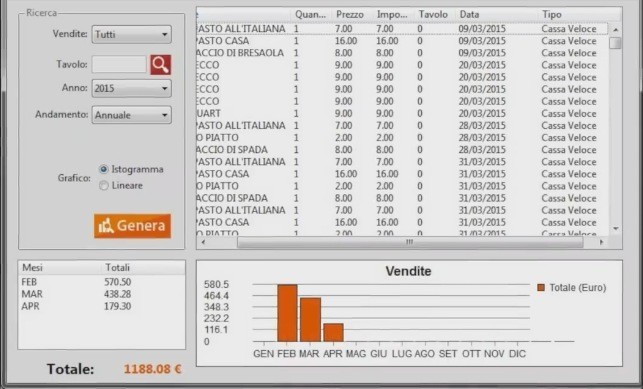
Ristomanager statistics. The new episode of our vlog will discuss the Ristomanager Statistics function. This is the best method to monitor the activity of your restaurant. Thanks to its powerful filters, you can know the sales performance of even a single table down to the smallest details. And you can also do it in a specific period.
You need an easy way for your staff and customers to see what success looks like, so that their efforts towards the same goal are more effective! This is where audit statistics come in – being able to recognize statistical trends helps everyone, from managers to waiters, understand exactly how each business is performing according to business objectives, as well as providing valuable feedback on potential areas needing improvement or growth opportunities within a given business model.
Ristomanager Statistics
The key to success for your restaurant is not just checking the statistics, but also paying attention and monitoring what is happening.
Are you curious about how well people are enjoying the food? Check out some of these stats!
1) If customers order more than 30 minutes before closing time, they will get significantly cheaper prices - up to 60% at midnight versus 11pm
2) Seating capacity should be around 48-50 seats if you want low employee turnover
Ristomanager Statistics are essential for understanding the strengths and risks of your business.
What immediately catches your eye when you view the Ristomanager Statistics is the completeness of the data. One thing that immediately catches your eye is how complete and well organized everything is. These are displayed in a clearly readable and easy to consult table. The table is accompanied in the lower part by a graph with the sales trend of a specific period, which you can decide before generating the statistics.
The Ristomanager Statistics allow you to filter the data in various ways. You can first choose the type of "Sales" you want to consult. In this case we refer to the "Quick Checkout" or "Orders". Here you can filter sales for a single table (option not available if you choose sales from “Quick Checkout”). Or you can consult those of a specific "Year".
It is also possible to establish what trend the graph below should follow. For this reason you will be able to know the sales of an entire year (previously selected from the appropriate menu) divided by month, or those of a specific month which can be selected from the menu that appears by choosing "Trend" > "Monthly".
All these filters can be easily combined with each other, allowing you to know every detail of your business, for example knowing the sales and even what was ordered from a hypothetical table called “Fantasia” on a single day in the month of March 2015.
You'll also get an idea of how well it's doing and whether or not there are any holes to fill!
Finally, you can choose the type of graph between “Histogram” and “Linear”. Your choice will depend on which graph you find easier to understand or more comfortable. In any case, next to the graph you will see a list of sales divided by month (if you have chosen the "Annual" trend). Or divided by Days (choosing the "Monthly" Trend) with the total sales of that period.
In the vlog you will find all this information along with many others.
So we suggest you take a look at it by clicking on the image in this same article. Wishing you a good viewing, we'll see you in the next episode of our vlog!
Comments
No comments yet. Be the first to comment!
Leave a Comment